Real-estate developers
For developers selling off-plan and ready units: lead-ad and WhatsApp leads shared fairly across the sales team and answered in minutes, every handover recorded.
Social · Ads · Every channel · Reply clocks
Post and schedule on all your social accounts, see what each ad campaign costs per lead and per sale, and answer WhatsApp, Instagram, Messenger, TikTok, Telegram, X, email and lead ads from one shared inbox. New leads go to whoever is ready, and a reply clock moves them on if nobody answers.
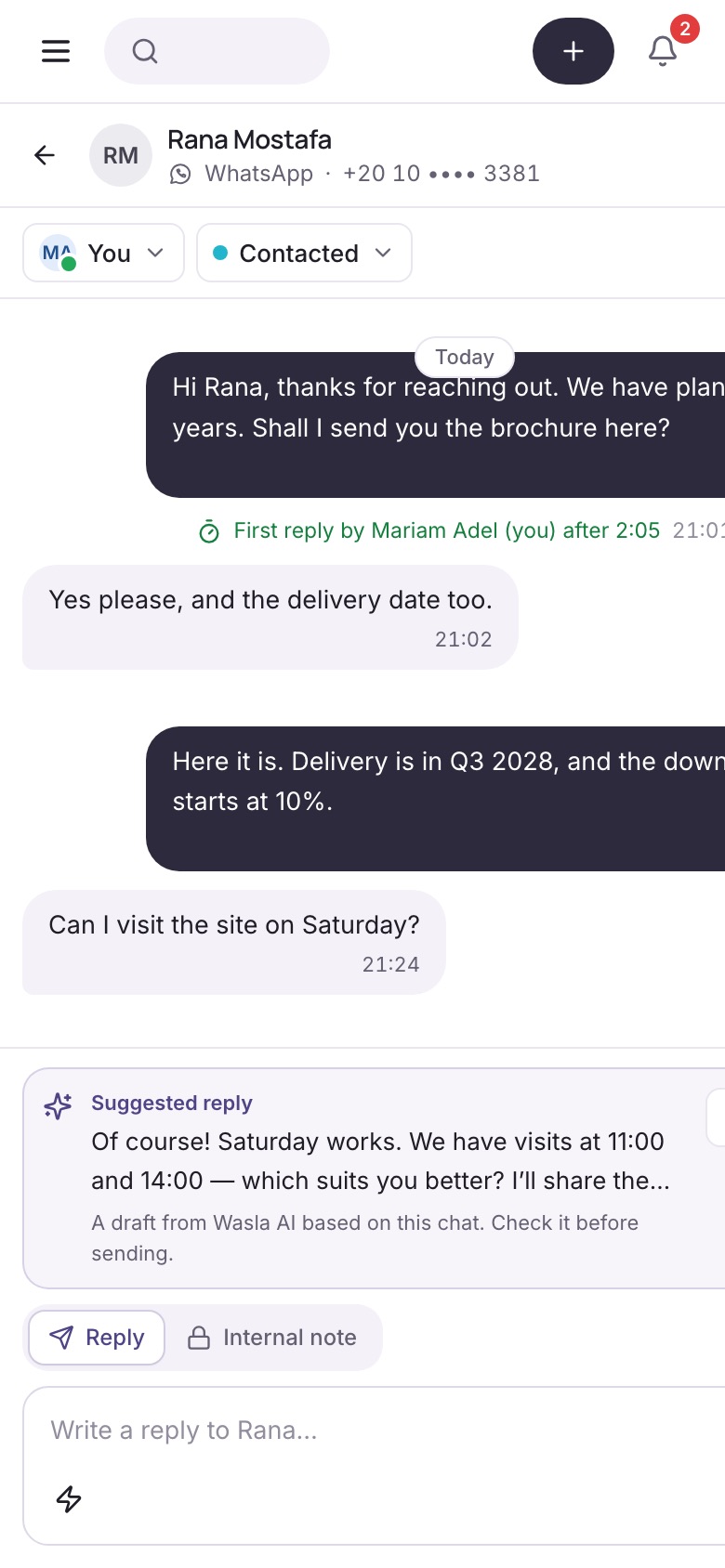
Real screen from the Wasla app, with a sample workspace.
Every place your leads write from, in one inbox
Each account connects with the network’s own sign-in. You choose which numbers, pages and accounts Wasla can use.
Three pillars, one place
Your social posts, your ad results and your customer chats meet in one workspace, so you can see which post or campaign brought each lead, and make sure someone answers it.
Social
Write a post once and publish it now or on a date to Facebook, Instagram, TikTok, LinkedIn, YouTube, Google Business, X and Threads.
Advertise
Connect your Meta, Google, TikTok, LinkedIn and X ad accounts. Wasla puts each campaign’s spend next to the leads it brought and the deals they closed.
Communication
WhatsApp, Instagram, Messenger, Telegram, TikTok, X, email, lead ads and your website form, shared by the whole team.
The product
Seven parts that work together. Pick one to see the screen from the app.
Chats from every channel land in one place, with views for what is yours, what nobody owns yet and what is waiting on your team.
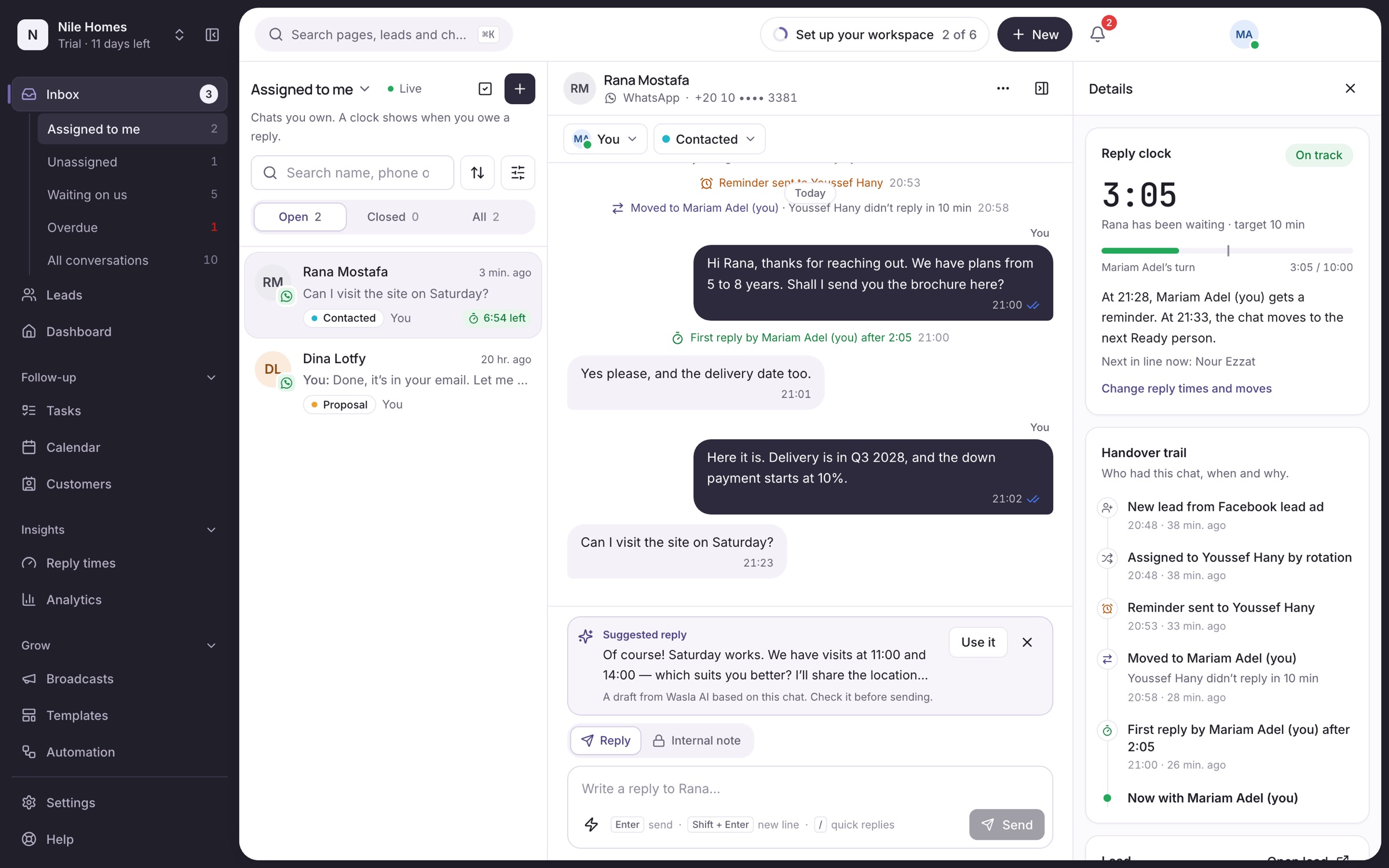
Compose a post, pick the accounts and publish now or schedule it. The calendar shows what goes out when, and an agency’s client can approve a post before it is published.
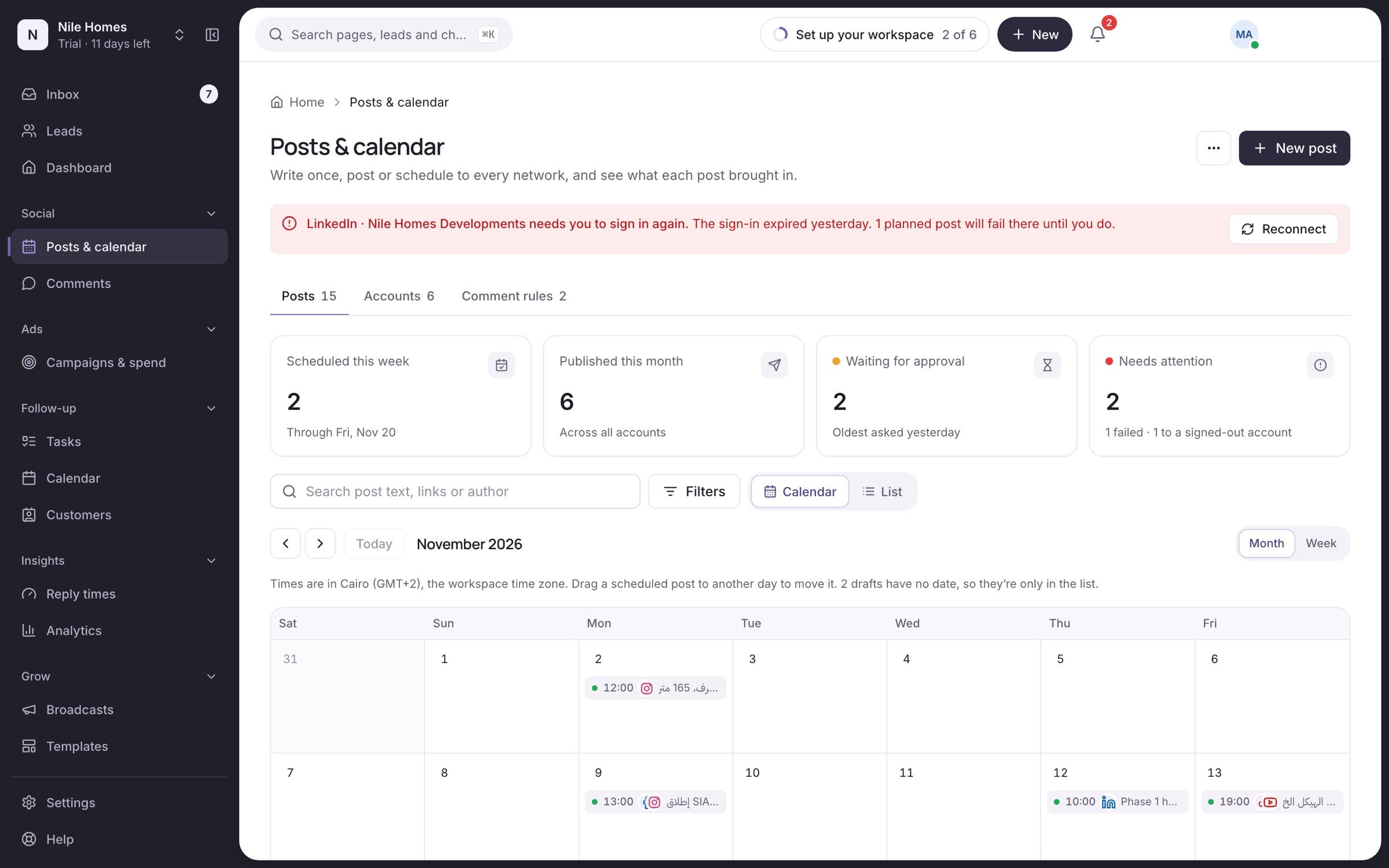
Connect your ad accounts and see each campaign’s spend beside its Wasla leads and won deals, so cost per lead and cost per sale come from what your team actually closed.
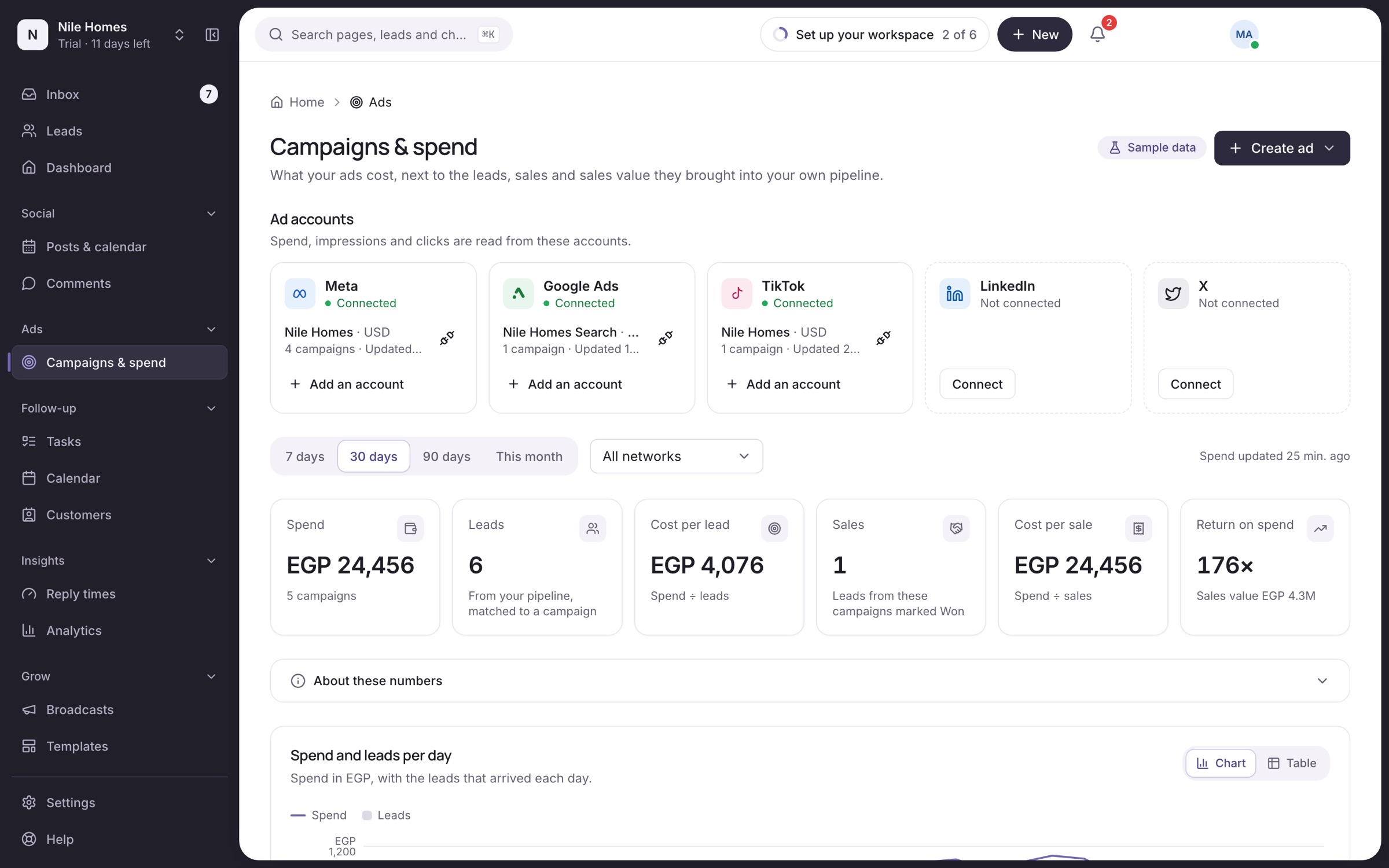
Take turns, give the next lead to whoever received the fewest today, or let the first to reply take it. People on a break or outside their shift are skipped.
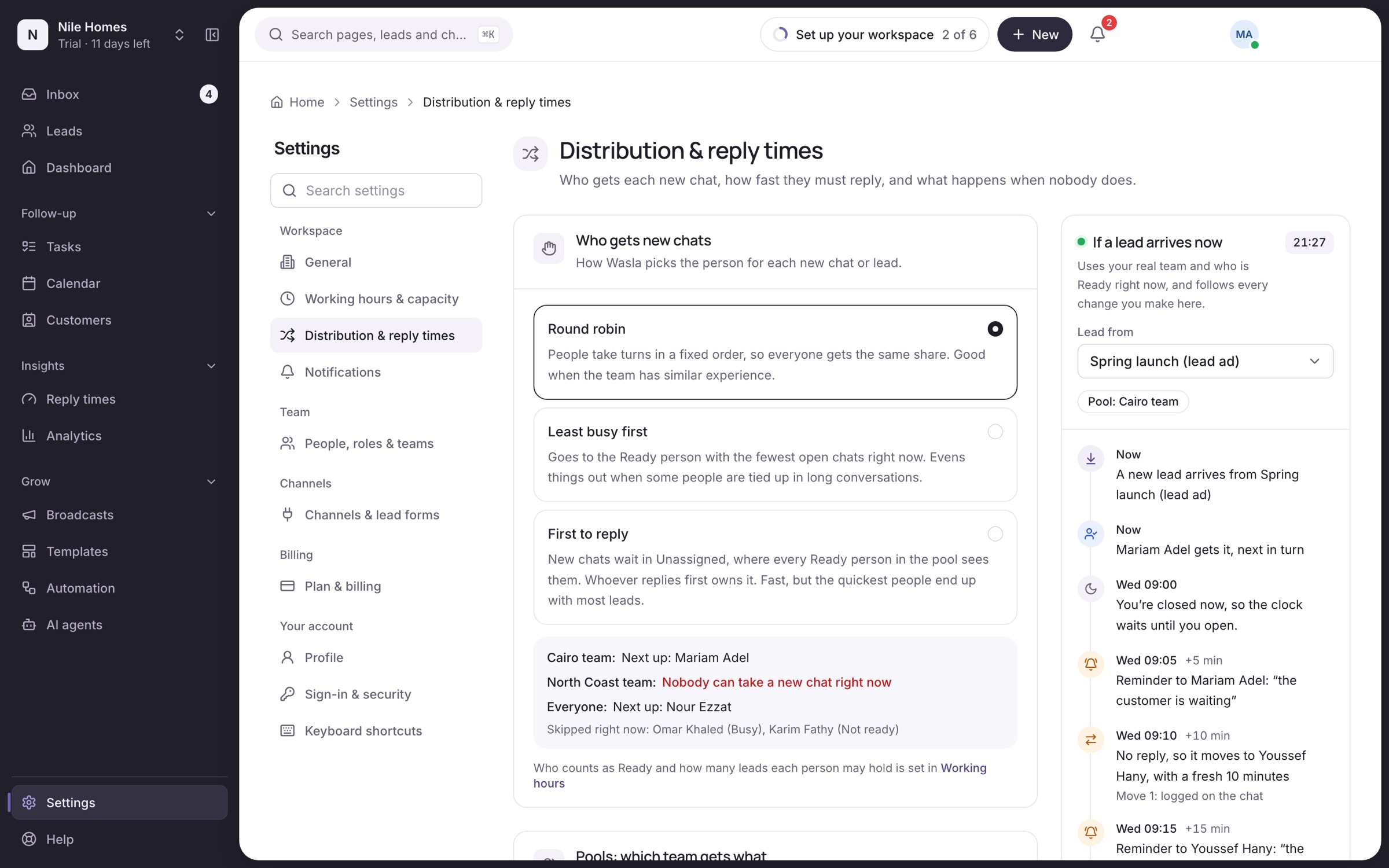
Set the first-reply time. Wasla reminds the owner, moves the chat to the next ready person when time runs out, and tells the team lead if it keeps bouncing. Only working minutes count.
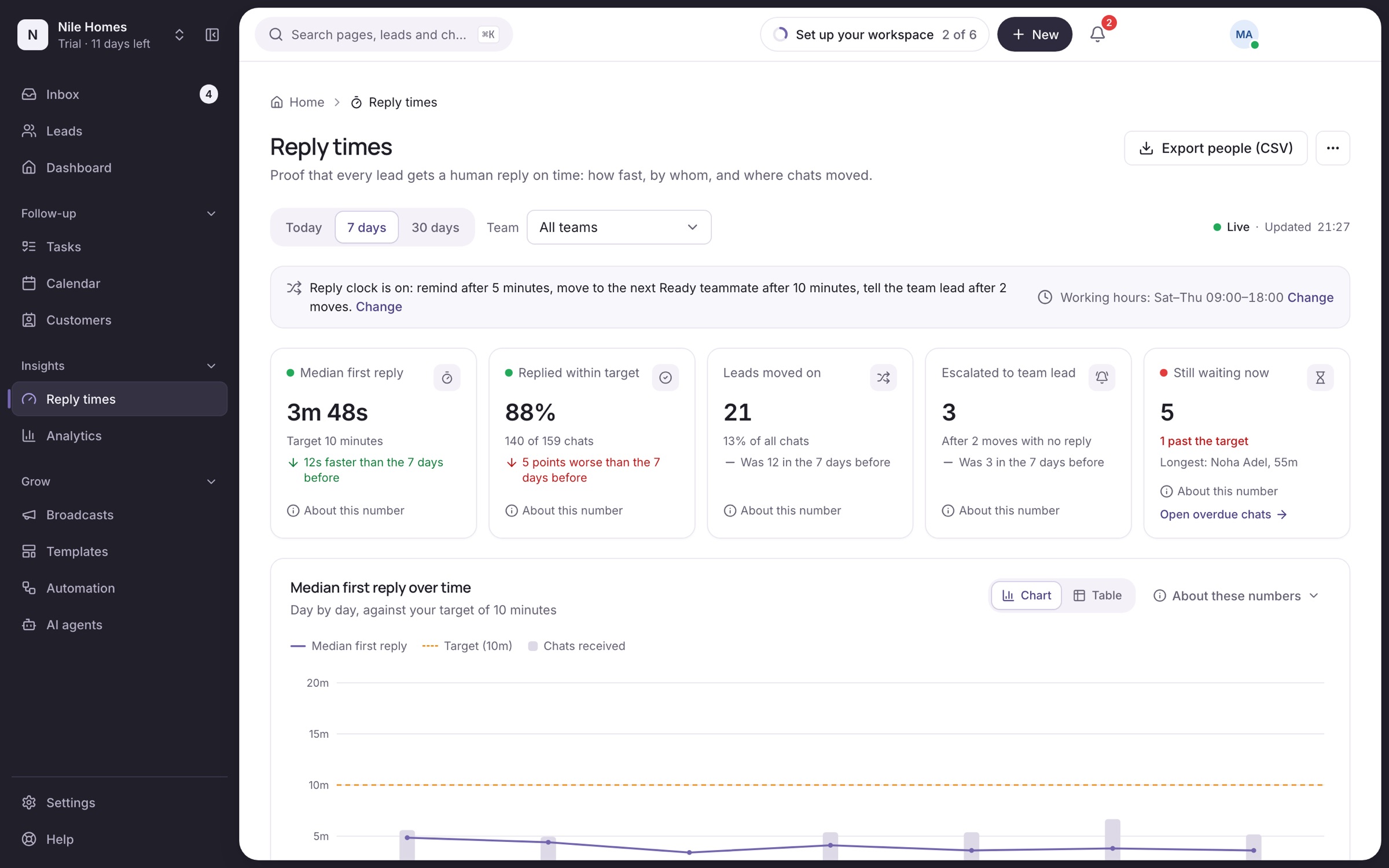
Kanban, table, list or pipeline views, filters that show the count before you apply them, import from a sheet and export any time.
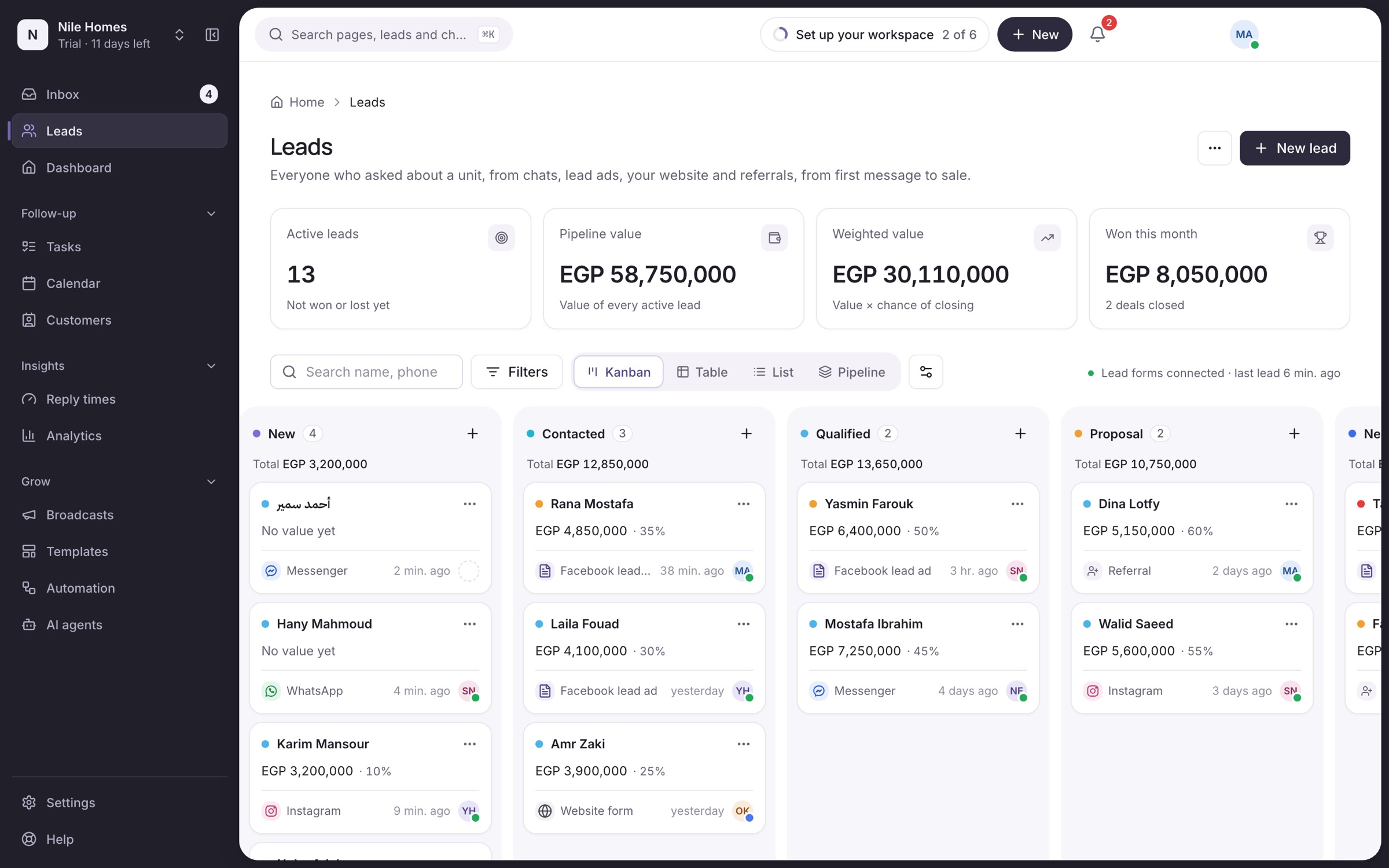
Median first reply, replies within target, leads moved on and escalations, per person, channel and campaign. Each number explains how it is counted.
How it works
One lead, minute by minute, with the default settings. You can change every time and rule.
Rana asks about 2-bedroom flats in New Cairo. Wasla saves the campaign and form with the lead.
Youssef is Ready and next in line, so the chat is his. Omar is busy and gets skipped.
Youssef gets an alert in the app. The clock keeps counting working minutes only.
The chat goes to Mariam, the next ready person, with the reason written in the trail.
The clock stops, the lead moves from New to Contacted, and the report counts her reply.
After the number of moves you choose, the team lead gets it in Overdue and can step in.
Live demo
This is the Wasla app running in your browser with a sample workspace. Open a chat, use the suggested reply, reassign it, change the stage. Nothing is sent to anyone.
AI reply suggestions
On every chat that waits for you, Wasla suggests a reply from the conversation so far. Your team edits it, sends it, or ignores it.
Channels and networks
Sign in to each network, pick the numbers, pages and ad accounts, and messages, comments and ad results start arriving. If a lead-ad page goes quiet, the owner and admins are told.
Not yet: SMS and phone calls, which our providers do not offer in Egypt and the Gulf today.
For agencies and broker networks
Marketing agencies get a workspace per client, with its own channels, ad accounts, team and reports. The agency switches between clients; each client sees only their own.
Reports
Managers see the slow spots before customers feel them.
When a Facebook page that usually sends leads goes quiet during working hours, or its connection breaks, Wasla tells the owner and admins, with a link to fix it.
Why Wasla
Reminders, moves and escalation happen on their own, not in a weekly meeting.
No more “who had this lead?”. The answer is written down.
Alerts when lead ads stop arriving, so a broken link costs hours, not weeks.
Priced per company with accounts included, not per seat, so adding a salesperson is not a debate.
Ad spend, the lead it brought and the deal it closed, on one screen.
Every screen in Arabic and English, right to left, with Latin digits.
Start the trial, choose a plan and pay by card when you are ready.
Export your leads any time. Owners can delete the workspace.
From the team behind Neravo, sales software for real-estate developers.
For developers selling off-plan and ready units: lead-ad and WhatsApp leads shared fairly across the sales team and answered in minutes, every handover recorded.
For brokerages with many agents: listings posted on every network, ad spend per lead, one inbox for every enquiry, fair rotation, and leads that stay with the company.
For clinics booking patients on WhatsApp and Instagram: one inbox for reception, fair sharing between front-desk staff, and no message left unanswered.
For schools, academies and training centres: enrolment enquiries from ads, WhatsApp and Instagram answered fast and shared fairly among advisors.
For car dealers and showrooms: enquiries from ads, WhatsApp and Instagram shared among consultants, answered in minutes and tracked to a test drive.
Wasla for Egyptian sales teams: Egyptian Arabic interface, WhatsApp and Facebook lead ads in one inbox, Saturday-to-Thursday working weeks, and prices shown in EGP.
Fair, dated comparisons with the tools sales teams in Egypt and the Gulf look at most.
17 November 2026
A buyer’s guide for Egyptian property sales teams: what a WhatsApp CRM must do, how we scored the options, and which one fits which team. Checked 17 Nov 2026.
17 November 2026
Wasla vs WATI for sales teams in Egypt and the Gulf: channels, lead rotation, reply clocks, broadcasts, chatbots and pricing, checked 17 Nov 2026.
17 November 2026
Wasla vs respond.io for sales teams in Egypt and the Gulf: channels, assignment, reply clocks, workflows, AI and pricing per user versus per company. Checked 17 Nov 2026.
17 November 2026
Wasla vs Linkiasoft CRM for teams in Egypt: channels, distribution, reply clocks, lead-ad alerts, trial terms and EGP pricing, compared fairly. Checked 17 Nov 2026.
17 November 2026
Is the WhatsApp Business app on a few phones enough for your sales team? An honest comparison with a shared inbox: ownership, speed, handovers, cost and when to switch.
17 November 2026
Excel and Google Sheets are free and flexible, but cannot assign a lead, time a reply or flag who is late. When a sheet is enough, and when it is not.
Not per user. Each plan includes people, connected accounts and WhatsApp numbers; add-ons raise the limits.
Example prices for the preview
For a small office that wants every chat answered on time.
$29 / month
Flat price for the whole company
Start free trialMost teams pick this
For a sales team that posts, advertises and answers on every channel.
$69 / month
Flat price for the whole company
Start free trialFor agencies, broker networks and developers with several brands or teams.
$149 / month
Flat price for the whole company
Start free trial17 November 2026
How sales and support teams in Egypt and the Gulf can answer on WhatsApp in Arabic: tone, dialect, templates, voice notes, numbers, working hours and handovers.
17 November 2026
Lead-ad forms can stop sending leads to your CRM without any error you can see. The usual causes, a 10-minute check, and how to get alerted when a form goes quiet.
17 November 2026
For property sales teams in Egypt and the Gulf: reply to new leads within minutes during working hours, set a clear rule for nights, and measure it weekly.
Neravo Wasla is one place to post on your social networks, advertise on your ad networks and talk to customers on every channel, with fair lead rotation and reply clocks so every lead is answered on time. It is built for real-estate teams, brokers and marketing agencies in Egypt and the Gulf.
Wasla is a shared inbox with lead routing built in, plus social publishing and ad reporting. Each lead keeps its source, campaign, stage, notes, owner and full chat history, which covers what most sales teams use a WhatsApp CRM for. It does not do accounting, contracts or property inventory; it focuses on bringing leads in and getting every one answered quickly by the right person.
Social: write a post once and publish or schedule it on Facebook, Instagram, TikTok, LinkedIn, YouTube, Google Business, X and Threads, with comments coming into the inbox. Advertise: connect your ad accounts and see spend, cost per lead and cost per sale per campaign, joined with your real Wasla leads. Communication: one shared inbox for every chat, with fair rotation and reply clocks. Social, Ads, Inbox.
Yes. Agency mode gives you a workspace per client, a client switcher, client approvals for posts, a report per client and one bill for all of them. How agency mode works.
Yes. Wasla is built for sales teams in Egypt and the Gulf, works fully in Arabic and English, and shows prices in US dollars with an approximate Egyptian pound view. Egypt, Saudi Arabia, UAE.
Wasla is built around what happens to a lead: fair rotation to people who are ready, reply clocks that remind, move on and alert a team lead, a handover trail on every chat, alerts when a lead-ad form stops sending leads, and ad spend joined with the leads and sales it produced, for one flat price per company. Our comparison pages set out the differences fact by fact, with dates and sources.
For conversations: WhatsApp (through the WhatsApp Business Platform), Instagram, Facebook Messenger, Telegram, TikTok, X, email (Gmail, Outlook or any IMAP mailbox), Facebook and Instagram lead ads, and a website form. For posting: Facebook, Instagram, TikTok, LinkedIn, YouTube, Google Business, X and Threads. For ad results: Meta, Google, TikTok, LinkedIn and X ad accounts. SMS and phone calls are not available in Egypt and the Gulf yet. All integrations.
Each new lead goes to the next person in turn who is marked Ready, is inside working hours and has room under their open-chat cap. Returning customers go back to the person who had them before. Rotation in detail.
One flat monthly price for the whole company, not per user, from $29 a month, with a number of connected accounts included and two months free on yearly billing (example prices until launch pricing is fixed). See all plans.
Yes. Meta charges WhatsApp Business conversation fees directly, based on your country and the message type. They are not part of the Wasla price. Replies inside the 24-hour customer-service window are free up to 1,000 a month per number (since 1 Oct 2026); after that Meta charges for them too.
Fully. Every screen is in Arabic and English, right to left when you pick Arabic, and each person chooses their own language. Numbers stay in Latin digits.
You need a number on the WhatsApp Business Platform. You can connect an existing number or a new one; a number still used in the WhatsApp app has to be moved over first.
You do. Wasla only processes them to run your inbox. You can export your leads at any time, and when you delete your workspace we delete its data. Privacy notice.
After 14 days you pick a plan and pay by card through Stripe. If you don’t, the workspace pauses: nothing is deleted straight away and you can come back to it.
Any time, from Settings > Plan and billing. You keep access until the end of the period you paid for and there is no cancellation fee.
Connect your accounts, add your team and set your reply times in one short setup. 14 days free, no card.